Choose and calibrate thread clearance
Calibrate thread fit with a small printed pair while holding the geometry and print profile constant. In STL-Nudge, Fit clearance adjusts both sides of a matching pair. It is not simply an extra amount added to the female hole diameter.
What Fit clearance changes
Let D be Major diameter and c be Fit clearance, in millimeters. The generator enlarges the female cutter radius by c/2 and reduces the male thread radius by c/2. Their nominal major diameters are D + c and D − c, respectively: a diametral difference of 2c. With matching custom-printable profiles away from the entrance and lead-in, the corresponding radial allowance is c.
For this guide's D = 12 mm and c = 0.25 mm example, the female major diameter is 12.25 mm and the male major diameter is 11.75 mm. The 0.50 mm major-diameter difference is not a 0.50 mm gap per side. It also does not predict every flank contact or a real printed gap.
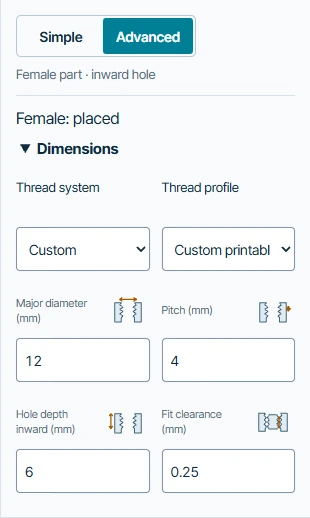
Make a controlled fit ladder
Start with the paired-sample walkthrough: Custom printable, diameter 12 mm, pitch 4 mm, linked lengths 6 mm, using the built-in cube and plate. These are software examples, not a recommended setting for every printer.
- Select connector 1 to return from the generated overview to its settings. In Advanced → Dimensions set Fit clearance to 0.15 mm. Generate and export both parts, signing in free at the export step if needed. Name or organize the pair so that it cannot be mixed with another clearance.
- Select connector 1 again, then repeat with 0.25 mm and then 0.35 mm. Re-generate each time. Keep diameter, pitch, profile, placement and both lengths unchanged. The software examples exported all three pairs and checked that increasing c removes more female material and makes the male thread smaller.
- In your slicer, keep printer, material, nozzle, layer height, wall settings and intended orientation the same across the pairs. Inspect the thread layers, entry, root and any support-contact surfaces. Do not change the model scale to tune fit: that also changes pitch and other dimensions.
- Print a small representative sample, including enough surrounding host material. Check assembly gently, without forcing a jammed thread. Record which pair starts cleanly and how loose it feels through the intended engagement.
- Choose the next trial from the observed result. Increase clearance if the same profiles bind; reduce it if they are too loose. Change one variable at a time, regenerate and re-test.
Keep the conditions with the result
Record the exact settings, file pair, printer/profile, nozzle, filament condition, orientation, observed fit and any damage after repeated assembly. Recheck when one of these changes. A fit that assembles easily may still have insufficient retention, wall thickness or strength for its job.
The numerical ladder above was checked in exported meshes only. No slicer inspection or physical fit result is claimed. Prusa's modeling guidance likewise treats fit as dependent on geometry, orientation, calibration and material. It does not validate these particular STL-Nudge settings.
Common questions
Does changing clearance affect only the viewed part?
For the linked thread pair, its shared clearance affects both generated sides. The engine applies half the value as a radial change to each side, in opposite directions. Independent engagement lengths are a separate control.
Is 0.25 mm the best setting?
No. It is an illustrative starting value in this walkthrough. Determine your setting from representative prints; inspect the troubleshooting guide if a change in clearance does not resolve the problem.
Can I skip printing a test?
Mesh checks cannot establish the effects of your slicer, extrusion, material or assembly. The software does not certify physical fit or a load rating.